
Tekmetric Mobile
TekmetricAuto & Vehicles
3.144.00 Reviews
- Version
- 1.40.0
- Installs
- 10.00K
- Age Rating
- Everyone
Screenshots
Our Review of Tekmetric Mobile
 Analysis by Appyee
When I look at Tekmetric Mobile, I see a focused workshop companion rather than a complete replacement for a desktop service-management system. Its main appeal is simple: it puts the first steps of a repair visit in the technician’s or service adviser’s hand instead of tying those steps to a counter computer. The app is built for the Auto & Vehicles category, costs nothing to download, and is aimed at businesses already working with Tekmetric’s repair-management platform.
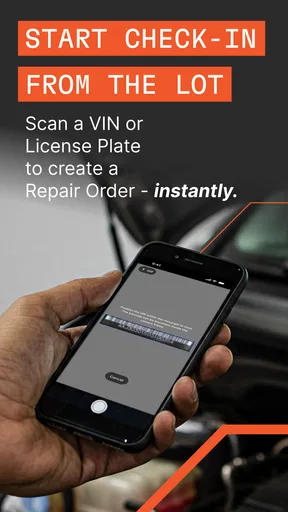
I spent my attention on the capability that matters most here: handling the opening stages of a customer visit from a phone. That means greeting the customer, beginning a repair order, and carrying out an inspection while moving around the vehicle. In theory, those actions sound modest. In a busy shop, though, removing the trip between the vehicle and the front desk can change the rhythm of an entire appointment.
Tekmetric Mobile comes from Tekmetric and has a 3.1 average from roughly seventy ratings, with more than forty written reviews and over ten thousand installs. Those figures suggest a real but still relatively small mobile audience, so I would approach it as a practical extension of an existing workflow, not as a mature all-purpose app for every kind of driver.
Taking the repair order to the vehicle
I would use this section to look beyond the convenience of starting an order beside a car and consider what happens when the phone’s connection is unreliable. Because the work involves creating and updating a shop record, I’d plan the handoff around having a dependable connection rather than assume an entry can wait safely on the device. That practical constraint leads into the broader question of where the mobile workflow earns its place.
Why this capability matters
The strongest idea in Tekmetric Mobile is location. A service adviser can start the customer interaction near the vehicle instead of asking the customer to wait while someone walks back to a workstation. That is especially useful when the car is already in a bay, parked outside, or being inspected in a crowded lot.
Starting a repair order at the point of contact can also make the conversation more concrete. Rather than trying to remember the customer’s concern after returning indoors, the adviser can work through the opening details while looking at the vehicle. The value is not that a phone magically improves diagnosis; it is that the initial record begins closer to the real-world problem.
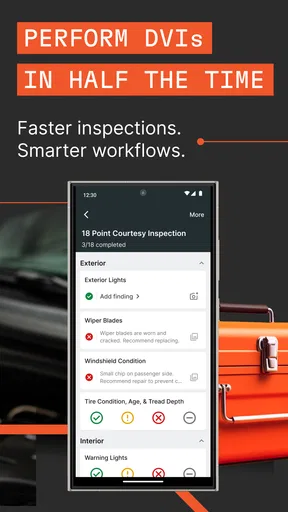
The inspection function is the other important part of this mobile approach. An inspection is easier to keep connected to the vehicle when the person performing it is not separated from the record by a desk. I find that distinction more meaningful than simply having a smaller screen version of a web application. The app makes sense when mobility is the point.
There is a useful operational trade-off here. A phone is quicker to carry than a computer, but it also gives the user less room to review dense information. Tekmetric Mobile therefore appears most valuable for capturing and progressing work at the vehicle, while a larger screen remains more comfortable for reviewing a complicated repair history or managing a long administrative session.
What the workflow feels like
A sensible visit would begin with the adviser greeting the customer beside the car, opening a repair order, and moving into the inspection without breaking contact with the vehicle. The phone becomes a working clipboard: it keeps the process moving while the adviser checks the car and records the relevant findings.
That sequence can reduce small delays that customers notice. There is no need to finish the greeting, leave the vehicle, create the order elsewhere, and then return before the inspection can begin. Each individual trip may be short, but repeated interruptions make a shop feel slower. The real benefit is continuity, not simply portability.
I would still use the app deliberately rather than trying to force every task onto the phone. Before beginning, I would make sure the customer and vehicle details are clear, keep the device charged, and avoid starting a long explanation while standing in a noisy bay. The mobile format is best used for immediate actions; detailed decisions may deserve a quieter review afterward.
For a small shop, that distinction could make the difference between a helpful tool and a frustrating one. If the team treats the app as the front-line capture point and the broader Tekmetric environment as the place for deeper administration, the roles are easier to understand. If someone expects the phone to replace every desktop interaction, the compact interface may feel limiting.
A realistic morning appointment
Imagine a customer arriving with a warning light and only a short window before work. Instead of taking notes at the counter and sending the customer away from the vehicle, the adviser can greet the driver beside the car, begin the order, and move into the inspection while the concern is still fresh. The adviser can keep the conversation tied to what is visible and avoid relying entirely on memory later.
That does not guarantee a faster repair or a correct diagnosis. It does improve the handoff from customer concern to shop record. If another team member takes over, the initial information has a better chance of being captured at the moment it was discussed rather than reconstructed from hurried notes.
The same workflow can help when a customer asks a follow-up question outside the reception area. The adviser can stay with the vehicle and continue the relevant order activity instead of postponing the answer until returning to a desk. I would consider that a particularly good fit for shops where the front counter and service area are physically separated.
There is also a less obvious advantage for consistency. A mobile-first inspection encourages the adviser to treat the inspection as part of the arrival process, not as an optional task that happens only when the schedule allows. That can make the opening routine more repeatable, although the result still depends on how carefully the shop trains its staff.
Practical habits that improve the experience
My first tip is to keep the opening interaction short and structured. The app can support the order and inspection, but it cannot prevent a rushed adviser from entering vague information. I would record the customer’s main concern in plain language before moving through the vehicle, then review the entry while the details are still easy to remember.
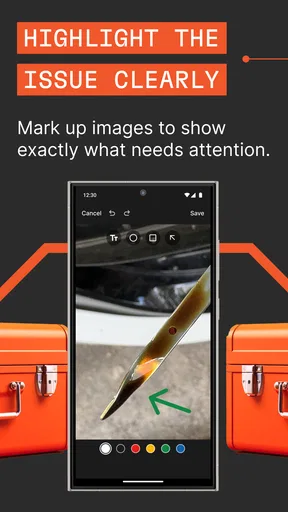
My second tip is to separate observation from recommendation. During an inspection, it is useful to capture what is seen before discussing what should be repaired. That habit makes the record clearer and reduces the risk of turning an early observation into an overconfident conclusion. The phone’s convenience is most helpful when it supports disciplined work rather than hurried tapping.
My third tip is to choose the right physical location. Standing beside a running vehicle, in direct sun, or in a noisy bay may make a phone workflow harder than expected. I would start the order in a calm spot near the car, then move into the inspection once the customer conversation is complete. Mobility gives flexibility, but it does not remove environmental distractions.
A fourth useful habit is to reserve a final review before leaving the vehicle. Small-screen entry is vulnerable to skipped fields, accidental backtracking, or wording that seemed clear in the moment but will be confusing later. A quick check can protect the value of the mobile workflow without adding another full administrative session.
Where Tekmetric Mobile fits—and where it does not
The comparison here is less about which tool is universally best and more about matching the interface to the job. A phone can keep the customer, vehicle, and opening inspection together, while a desktop or paper process may suit longer reviews or awkward shop-floor conditions better. I’d judge the fit by how often staff need to leave the counter and whether their existing Tekmetric workflow can support that shift.
The best match for service advisers and mobile inspections
The clearest audience is a repair shop that already uses Tekmetric and wants advisers to spend more time near customers and vehicles. The app is also a natural fit for teams that lose time walking between a counter and a service bay. In those settings, starting repair orders and performing inspections from a phone address a real physical bottleneck.
It may be especially useful for a shop with several advisers sharing responsibility for arrivals. A mobile workflow lets the person who meets the customer begin the process directly, rather than creating a queue around one workstation. That does not eliminate coordination problems, but it can distribute the first step more naturally across the team.
I would be more cautious for a private car owner looking for maintenance reminders, roadside help, or a way to compare repair prices. This is not presented as a consumer driving assistant. Its purpose is tied to shop operations, so downloading it without a Tekmetric-based business workflow may offer little practical value.
I would also hesitate to recommend it as the only tool for a shop that has no interest in Tekmetric’s wider system. A mobile repair-order app is useful when its records connect to the business process behind it. Without that context, the phone interface alone is unlikely to solve scheduling, customer communication, inventory, or accounting needs.
How it compares with the usual alternatives
The usual alternative is a desktop browser or a workstation at the service counter. That option wins for visibility: larger screens are better for scanning multiple details, correcting text, and reviewing a complex order. A desktop setup can also feel more stable for long sessions. Tekmetric Mobile wins when the user needs to leave the counter and take the workflow to the vehicle.
A paper inspection sheet is still quick to hold and easy to use in awkward conditions. It does not depend on a phone screen or a mobile interaction, and some technicians may prefer writing during a physical check. Its weakness is the later handoff: someone must interpret the handwriting and transfer the information into the shop’s digital process. The mobile approach can reduce that second stage, provided the entry is completed carefully.
Another alternative is a generic notes app or camera roll. Those tools are flexible, but they separate the observation from the repair-order workflow. A note may describe a concern without being attached to the right business record, while a photo can sit outside the process entirely. Tekmetric Mobile is more specialized because its purpose is to connect the opening interaction, order creation, and inspection within the shop’s own environment.
That specialization is also its limitation. A generic tool can be adapted to unusual situations, while a purpose-built app expects the shop to follow a defined process. I prefer the specialized route for repeatable service operations, but a highly independent technician who wants a blank canvas may find a general notes or field-work app more flexible.
Small-screen friction and workflow discipline
The most obvious friction is the phone itself. Entering detailed information on a compact display is less comfortable than working at a computer, particularly when the repair order becomes complicated or the inspection requires careful wording. I would not want to spend an entire day doing every administrative task on a handset.
The app’s value also depends on staff adoption. If one adviser starts orders on the phone, another uses paper, and a third waits for the counter computer, the shop may end up with inconsistent records. The mobile capability is strongest when the team agrees on when to use it and what information must be captured before moving on.
Because the app is free, the initial barrier to trying it is low. That does not mean the total business decision is cost-free: a shop still needs to consider training, device handling, and whether the existing Tekmetric workflow supports the way its staff actually work. I would test it with a small group first, using real arrival and inspection routines, before making it central to every employee.
The age rating is Everyone, and the app runs on Android seven or later. That makes it accessible across a broad range of Android phones, including older devices that a shop may already own. Still, compatibility alone does not tell me whether an older handset will feel pleasant for repeated professional use. Screen size, battery condition, and responsiveness matter just as much in practice.
Version context and expectations
The current version is 1.40.0, while the app was released on October 1, 2024. I read that as a relatively young mobile product rather than a tool with a long-established history on every shop floor. The install base is growing, but it remains modest enough that I would pay attention to how well the app fits a particular team instead of assuming universal maturity.
That does not make it a poor choice. Newer software can be appealing when a business wants a direct mobile workflow rather than years of accumulated complexity. My recommendation would be to judge the app on the specific opening process: can advisers greet, start the order, and inspect without losing information or slowing the customer down?
I would also make sure the team knows when to move to a larger screen. A good mobile strategy is not “phone for everything.” It is “phone where being beside the vehicle matters, larger interface where review and administration matter more.” That division gives Tekmetric Mobile a realistic role instead of asking it to compete with a desktop environment on its weakest ground.
Who should install it
I would recommend Tekmetric Mobile to a repair business already using Tekmetric, especially one whose advisers regularly walk between reception and the service area. The strongest gains go to people who need to begin a repair order during the customer handoff and carry out an inspection without returning to a fixed computer.
I would also suggest it for managers trying to improve the consistency of arrival inspections. The app can make the desired sequence more visible: meet the customer, open the order, inspect the vehicle, and review the entry. It will not enforce good judgment, but it can support a repeatable routine that paper notes and verbal handoffs often weaken.
I would skip it if I were a consumer seeking a personal vehicle-management app, or if I ran a shop that does not use Tekmetric and does not want its workflow shaped around that platform. I would also choose a desktop-first approach for a role centered on lengthy order editing, reporting, or other tasks where a large display is more important than being mobile.
My recommendation after weighing the trade-offs
Tekmetric Mobile is at its best when I treat it as a bridge between the customer, the vehicle, and the repair order. Its promise is not broad entertainment or a collection of unrelated automotive tools. It is a focused way to move the beginning of service work into the place where the conversation and inspection actually happen.
The free price makes a trial easy, and the Everyone rating plus Android seven compatibility make it approachable for many shop devices. The 3.1 average means I would not install it blindly and assume every experience will be smooth. I would run a practical test with real arrivals, compare the mobile entry with the shop’s existing counter process, and ask whether the saved movement outweighs the small-screen compromises.
My final view is positive but specific: this is worth considering for Tekmetric shops that want a more mobile customer handoff, not for people searching for a general car app. If your biggest problem is that repair orders and inspections begin too far from the vehicle, the app addresses that problem directly. If your biggest problem is complex back-office management, a larger interface will probably remain the better choice.
In short, I see Tekmetric Mobile as a useful front-line tool whose success depends on disciplined use. Keep the initial record clear, inspect while the vehicle and customer concern are in front of you, review the entry before moving on, and leave heavier administration to the environment better suited for it. Used that way, the app can make a repair visit feel more connected from the very first interaction.
Verdict
Strengths of Tekmetric Mobile
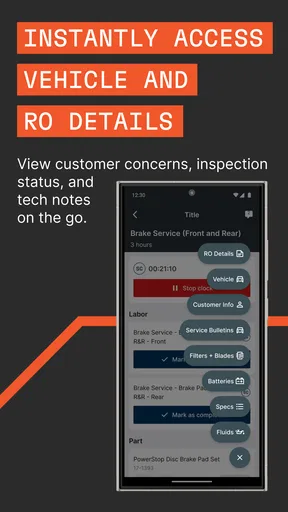
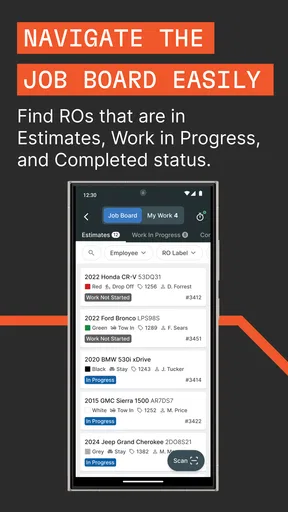
- Quickly review repair orders, vehicle details, and customer information on the go.
- Mobile access helps shop owners stay updated away from the front desk.
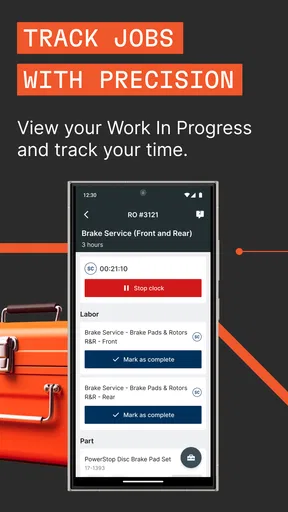
- Technicians can check relevant work details without returning to a desktop.
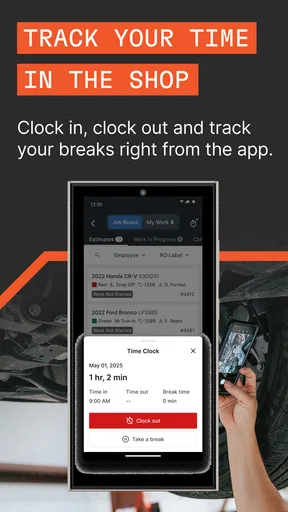
- Useful for monitoring shop activity and keeping communication moving.
- Designed to complement Tekmetric’s shop management platform.
Limitations of Tekmetric Mobile
- Requires an active Tekmetric account and may not work as a standalone app.
- Some advanced management tasks still require the web-based platform.
- Performance depends heavily on internet connectivity at the repair shop.
- The interface may feel limited on smaller phone screens.
- Not suitable for shops that do not already use the Tekmetric ecosystem.
Similar Picks in This Category
View All
Android Auto
Google LLC4.1

maxim — order a taxi & food
PT. SITO4.7

Штрафы ГИБДД: проверка с фото
Pays LLC – Штрафы ГИБДД4.7

Номерограм – проверка авто
Авто Ассист4.8

Дром Авто
Дром4.9

Frequently Asked Questions
What is Tekmetric Mobile used for?
Tekmetric Mobile is designed to help automotive repair shop owners, managers, service advisors, and technicians stay connected with shop operations from a mobile device. Depending on the user’s permissions, it can provide access to customer and vehicle information, repair orders, appointment details, inspections, technician updates, and workflow activity without requiring constant access to a desktop computer.
Who can use Tekmetric Mobile, and is it suitable for individual car owners?
Tekmetric Mobile is primarily intended for automotive repair businesses that use the Tekmetric shop management platform. It is not a general-purpose vehicle maintenance app for private car owners. Access normally depends on an existing Tekmetric account and the permissions assigned by the shop administrator, so available features may differ between owners, managers, advisors, and technicians.
Do I need a Tekmetric account to use the mobile app?
Yes, Tekmetric Mobile generally requires an authorized Tekmetric account connected to a participating automotive repair shop. Downloading the app alone will not provide access to shop records or management tools. Users should receive login details or an invitation from their organization, and an administrator may need to activate the account or configure permissions before all relevant information becomes visible.
What information and features are available in Tekmetric Mobile?
The exact feature set can vary according to the user’s role, account configuration, and app version. In general, the app is intended to make important shop information more accessible, including repair orders, appointments, customer and vehicle records, inspections, notes, and workflow updates. Some actions may be limited on mobile, so complex administrative tasks may still be easier to complete through the web platform.
Is Tekmetric Mobile free, and what should I check before downloading it?
The mobile application may be available to download without a separate purchase, but access to its business features is typically connected to a paid Tekmetric subscription used by an automotive repair shop. Before installing it, confirm that your shop uses Tekmetric, that your account has mobile access, and that your device meets the current operating-system requirements. Also review the app’s privacy, notification, and data-access permissions.
